 opensus
Compare designs
Compare is a Pro feature. It keeps one baseline design separate from the working model, then shows the differences as you edit. It is useful for a geometry revision or comparing two saved cars, without overwriting the current design just to inspect the older one.
Pick a baseline
Open Compare → Snapshot this design now before making an edit. Alternatively, choose a design under Saved in this browser, a built-in example, or Open a project file…. A snapshot freezes the current project at that moment; later edits do not update it.
The baseline is stored separately in this browser when storage is available. It is not bundled into the current project's file. Save the baseline project separately if you need to reproduce the comparison on another computer.
Read the differences
The summary lists Baseline, Now and Change at the design position. Use Changes to focus on changed metrics or Everything to see the full summary. It includes alignment, roll centers, anti geometry, motion ratios, ride frequencies and roll gradient where available.
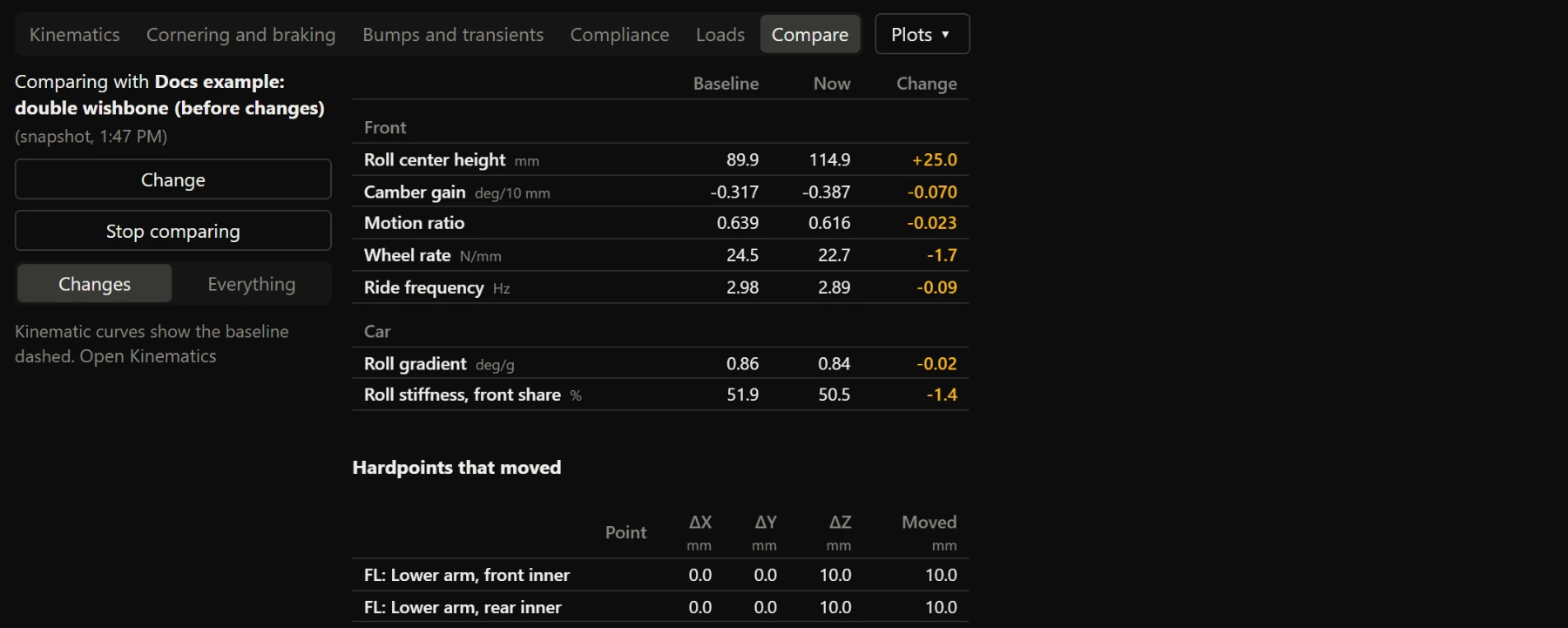
Hardpoints that moved lists coordinate differences and total movement, plus added or removed points. The coordinate columns follow the editor's axes and units. This table is a point comparison, not an exhaustive change log of all project fields.
Go to Kinematics to see dashed baseline curves behind the current Heave, Roll or Steer curves. The comparison uses the selected sweep range. Adjuster sweeps and whole-car transient histories do not receive this whole-design baseline overlay; use saved plots for time-history comparisons.
Worked example
- Open this page's simple double-wishbone geometry and take a snapshot.
- Raise the front Lower arm, front inner, Lower arm, rear inner and Tie rod inner points by 10 mm in ISO Z.
- Compare roll-center height at the design position: the tested result changes from about 89.9 mm to 114.9 mm.
- In Kinematics → Heave, inspect camber gain and toe as well as roll center. Raising a roll center has other geometric effects.
The complete measurements and rationale are in setting roll-center height. Use Change to choose another baseline and Stop comparing to remove it and the overlays. Neither action reverses your edits; use Undo or reopen a saved project to restore geometry.